
Finding a portable scientific calculator for Windows 10 that doesn’t drag a bunch of bloatware onto your machine is harder than it should be. Most ‘free’ options either nag you with ads, bundle toolbars, or demand admin rights just to run. That’s exactly the gap the DSG Full Portable Scientific Calculator tries to fill — a single executable you drop on a USB stick and run anywhere.
I’ve tested it on Windows 10 and 11, and while it’s still labeled beta, it does the job for everyday scientific math. Here’s the honest breakdown: what works, what doesn’t, and how to get it running without headaches.
What Exactly Is the DSG Full Portable Scientific Calculator?
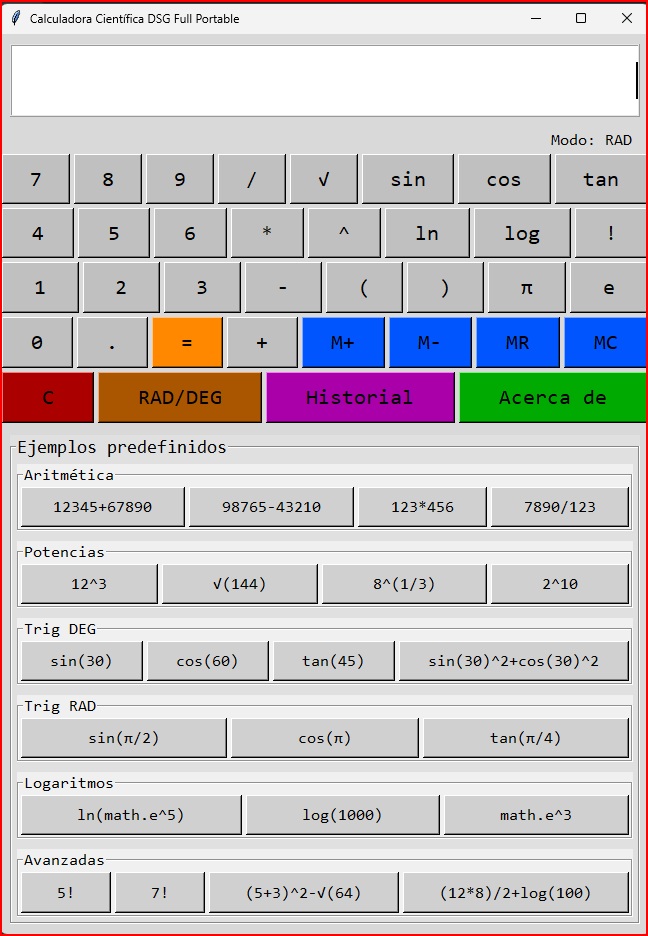
It’s a desktop app built in Python 3.x using Tkinter for the interface. No installer, no registry entries, no system file modifications. You download one .exe, double-click, and it opens. That’s the whole point of a scientific calculator portable free PC Windows tool: zero footprint.
The numerical engine relies on Python’s Decimal module configured to 28 decimal digits of precision — noticeably better than the default floating-point math most basic calculators use. Translation: fewer rounding surprises in long decimal chains.
System requirements are almost laughable in 2026: Windows 7 through 11, 512 MB RAM minimum (1 GB recommended), 10 MB of disk space, no dependencies. A Raspberry Pi running Windows would probably handle it.
Scientific Functions You Actually Get
Let’s cut through the marketing. Here’s what the portable scientific calculator Windows 10 build ships with right now:
- Basic arithmetic: addition, subtraction, multiplication, division, decimals, parentheses
- Constants: π and e built in
- Trigonometry: sin, cos, tan plus their inverses (asin, acos, atan)
- Hyperbolic: sinh, cosh, tanh
- Logarithms: log (base 10) and ln (natural)
- Powers and roots: ^ and √
- Factorials with the ! operator
- Memory keys: M+, M-, MR, MC
- History of the last 50 calculations
- RAD / DEG mode toggle
That covers 95% of what a student, engineer, or lab tech needs on a daily basis. If you’re doing symbolic algebra or matrix work, you need something else — this isn’t MATLAB and never pretends to be.
How to Open It on Desktop and Run the Portable Version
Opening it is genuinely simple, which is rare:
- Download the file Calculadora Científica DSG Full Portable.exe (the filename is in Spanish, don’t let that throw you — the app works fine in English contexts).
- Save it to any folder, or better, a USB drive.
- Double-click to launch. No installation wizard appears.
- Use the on-screen buttons or your numeric keypad to enter expressions.
- Hit «=» to get the result.
For desktop access, right-click the .exe and choose ‘Send to → Desktop (create shortcut)’. That gives you a one-click launch icon without touching Program Files. If you want it pinned to the taskbar, launch it first, then right-click the taskbar icon and pin.
One caveat: Windows SmartScreen may flag it on first run because it’s an unsigned PyInstaller executable. Click ‘More info’ → ‘Run anyway’. This is normal for free indie tools, not a virus warning.
Beta Limitations You Should Know Before Relying on It
The developer is upfront about this being a beta. That honesty is refreshing, but it also means you need to be careful with certain use cases:
- Complex nested operations can produce calculation errors
- Advanced functions occasionally become unstable
- Extremely long expressions get truncated or misinterpreted
- Unexpected crashes happen under specific conditions
- Compatibility isn’t guaranteed across every Windows build
My take: for homework, quick unit conversions, or checking a spreadsheet formula, it’s fine. For anything where a wrong digit costs money or safety, verify results independently. The EULA explicitly says the same thing, and it’s not legal boilerplate for once — it’s a real warning.
Privacy, Safety, and What It Does Not Do
Here’s what I verified while testing the download free portable scientific calculator for computer package:
- No personal data collection
- No internet connection required to compute (only to open the help documentation)
- No modification of system files or registry
- No background services or startup entries
That’s the entire security profile. Nothing phones home, nothing nags you to upgrade to a ‘Pro’ version. Compare that to the average browser-based calculator that loads three trackers before you type your first number.
Who Should Actually Use This Tool
Let me be direct: this is not for professional engineers doing critical load calculations. The EULA forbids use in medical devices, air traffic control, nuclear systems, financial transactions, and any context where an error causes material damage. That’s not paranoia — it’s a beta product with known error modes.
Where it shines: students who need a free scientific calculator portable no install option on a locked-down school PC, IT techs who want a calculator on a diagnostic USB, anyone on a shared computer who can’t install software, and people who just want a calculator that opens in under two seconds without a login screen.
The trig mode toggle (RAD/DEG) is a small detail that matters more than people admit. Forgetting to switch modes is the #1 source of wrong answers in intro physics classes, and having it visible on the interface helps.
The Legal Reality in Plain English
The software is freeware. It comes ‘as is’ with zero warranties. The author is not liable for any damages — direct, indirect, or consequential. Non-commercial redistribution is allowed as long as the documentation stays intact. There’s no guaranteed support, no update schedule, and no promise that reported bugs get fixed.
That’s the deal. Take it or leave it. For a free tool that does what it says, it’s a fair trade — just don’t expect a help desk.
Bottom Line for 2026
If you need a portable scientific calculator for Windows 10 that runs from a USB stick, respects your privacy, and handles real scientific notation without an install, this is a solid pick. It’s in beta, so treat it accordingly: use it, verify critical results, and keep a backup calculator app for emergencies. The fact that it’s Python-based means future updates can fix the current rough edges without a full rewrite.
Download it, drop it on a stick, and stop fighting with web calculators that lag every time you press a key.